Eremit (C64)
A downloadable game
HOW TO PLAY:
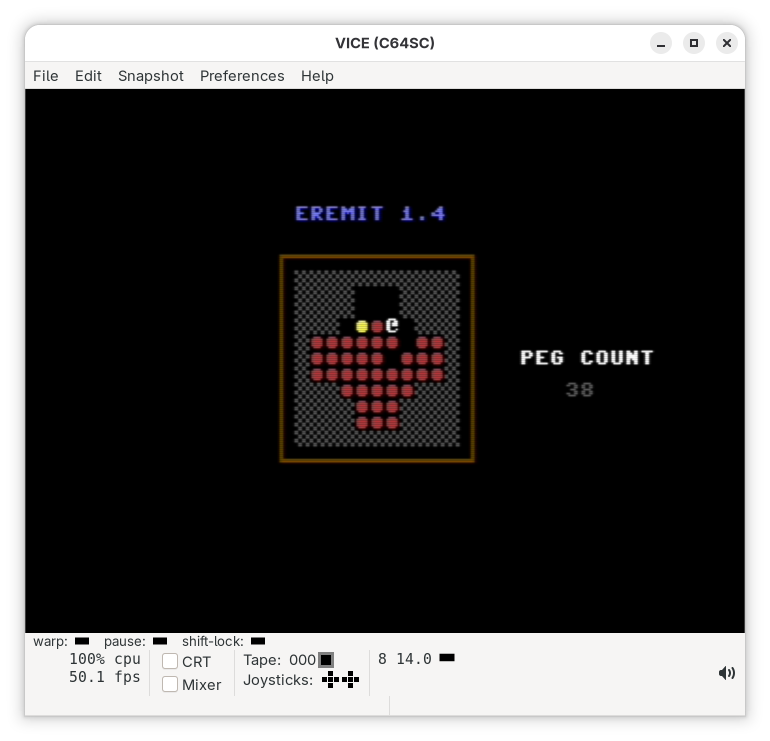
Peg Solitaire is a single-player puzzle game played on a board with holes and pegs. The goal is to remove pegs by jumping one peg over another into an empty hole, similar to checkers. The jumped peg is removed from the board. Moves are allowed only horizontally or vertically, not diagonally. You continue making jumps until no more moves are possible. The challenge is to finish the game with as few pegs left as possible—ideally just one.
EREMIT 1.2 BOARD FILE FORMAT:
This document explains how to create custom board files for Eremit 1.2. It outlines the required file format, valid characters, and the steps needed to load and share custom boards.
HOW TO CREATE A BOARD:
Create the board using any plain text editor. Boards can be created on a C64 or on any modern operating system. Regardless of where the file is created, it must be copied to a C64 disk before it can be used by the game.
THE BOARD:
A board is defined as an 11 × 11 grid of characters. The board file must contain exactly 11 rows, with 11 characters per row. Each character represents a specific type of location on the board.
BOARD VALIDATION:
When a board is loaded, the board loader verifies that the file contains exactly 121 characters (11 × 11). If the file contains more or fewer characters, the board will fail to load.
VALID CHARACTERS IN FILE FORMAT:
0 = Outside the play area
1 = Peg position
2 = Empty position
Only these characters are valid. Any other character may cause the board to load incorrectly or fail validation.
TEMPLATE:
A board template file is provided on the disk. This template can be used as a starting point for creating new boards and helps ensure that the correct format is followed.
HOW TO LOAD THE BOARD:
Start Eremit and press F4. You will be prompted to enter a device number. If you are unsure which device to use, try device 8.
Next, you will be prompted to enter a filename. This should be the name of the board file you created. Once entered, the board will be loaded.
A basic validation check will be performed during loading. If the board passes this check, you will return to the main menu with the new board selected. Press F1 to begin playing with the loaded board.
DISTRIBUTE AND SHARE A BOARD:
If you create a board and would like to share it with other players, you may send the board file or the board definition to me. Submitted boards may be included in future versions of the game.
Download
Click download now to get access to the following files:
Development log
- Version 1.4 releasedMar 14, 2026
- Eremit Version 1.3Mar 01, 2026
- Eremit 1.2Jan 24, 2026
- Eremit (C64) Version 1.1Jan 19, 2026
- Eremit (C64) 1.0Jan 15, 2026
Leave a comment
Log in with itch.io to leave a comment.